Chevrolet Cobalt Service & Repair Manual: Battery Cable Terminal End Service
| Caution: Use protective gloves
and eye protection. |
| Caution: Perform procedure
in a well ventilated area. |
| Caution: Refer to cautions
and warnings listed on battery. |
| Caution: Do not allow baking
soda solution to enter vent holes, as damage to battery can result. |
| 1. |
Remove battery from vehicle, as required. |
| 2. |
Clean top of battery (3) with a solution
of warm water and baking soda (2), Fig. 1. |
| 3. |
Apply soda solution (2) with a bristle
brush (1) and allow to soak until acid deposits loosen, Fig.
1. |
| 4. |
Rinse soda solution from battery with
clear water and blot battery dry with paper toweling. Dispose of
toweling in a safe manner. |
| 5. |
Inspect battery case and cover for
cracks, leakage or damaged hold down ledge. Replace battery if any
damage is evident. |
| 6. |
Inspect battery tray for damage caused
by acid from battery. If acid is present, clean area with baking
soda solution. |
| 7. |
Clean battery posts with a battery
post cleaning tool (1), Fig. 2. |
| 8. |
Clean battery cable clamps (2) with
a battery terminal cleaning tool (1), Fig. 3. |
| 9. |
Replace cables that are frayed or have
broken clamps. |
| 10. |
Install battery into vehicle, as required. |
|
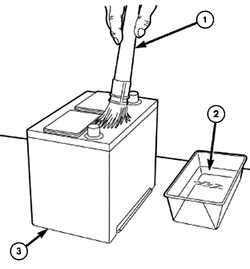
Fig. 1 Battery cleaning procedure
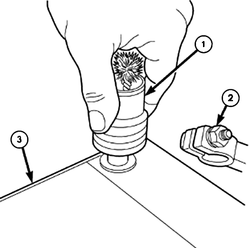
Fig. 2 Battery post cleaning procedure
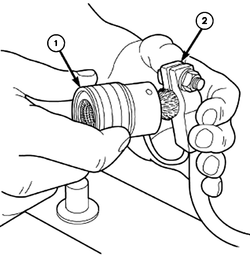
Fig. 3 Battery clamp cleaning procedure
Ground Cable
Battery To Battery Tray
Caution: Unless directed otherwise,
the ignition and start switch must be in the OFF or LOCK position, and all
electrical loads must be OFF before ...
Chevrolet Cobalt Owners Manual
Chevrolet Cobalt Service Manual

 Maintenance
 Battery Cable, Replace