
Chevrolet Cobalt Owners Manual: Cruise Control
Chevrolet Cobalt Owners Manual / In Brief / Cruise Control
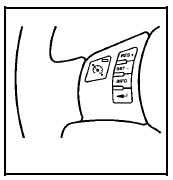
The cruise control buttons
are located on the left
side of the steering wheel.
 : On/Off.
 : Press to resume or
accelerate speed.
 : Press to set or decrease
speed.
For more information, see Cruise Control.
 Bluetooth®
For vehicles with an in-vehicle Bluetooth system, it
allows users with a Bluetooth enabled cell phone to
make and receive hands-free calls using the vehicle’s
audio system and controls.
The Blue ...
 Power Outlets
Accessory power outlets can be used to connect
electrical equipment, such as a cellular phone.
The accessory power outlet is located in the center
console, rearward of the shift lever.
To use the ...
See also:
Chevrolet Cobalt Owners Manual. Reconfigurable Performance Display (RPD)
For vehicles with the RPD, the screen displays
information that can be used to monitor vehicle
performance. The RPD knob located next to the
screen is used to configure the display and select
information to be viewed.
A short video plays whenever the ignition key is turned
on. Press the RPD kn ...
Chevrolet Cobalt Owners Manual
- In Brief
- Seats and Restraint System
- Features and Controls
- Instrument Panel
- Driving Your Vehicle
- Service and Appearance Care
- Maintenance Schedule
- Customer Assistance Information
Chevrolet Cobalt Service Manual
- Air Bags
- Air Conditioning & Heater
- Body & Frame
- Brakes
- Cooling System
- Driveline
- Electrical
- Electronic Stability Controls
- Engine Service

Copyright © 2026 www.cheviguide.com - Chevrolet Auto Manuals - 0.0078