
Chevrolet Cobalt Owners Manual: Audio Steering Wheel Controls
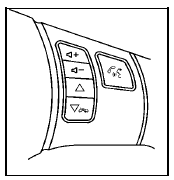
Vehicles with audio
steering wheel controls
could differ depending
on the vehicle's options.
Some audio controls
can be adjusted at the
steering wheel.
 - (Volume): Press to
increase or to decrease
the radio volume.
 (Next / Previous): Press to
change radio
stations, select tracks on a CD, or to select tracks and
navigate folders on an iPod® or USB device.
To change radio stations:
- Press and release  to go to
the next or
previous radio station stored as a preset.
- Press and hold  to go to the
next or
previous radio station in the selected band with
a strong signal.
To select tracks on a CD:
Press and release  to go to
the next or previous
track.
To select tracks on an iPod or USB device: 1. Press and hold w or x while listening to a song until the contents of the current folder display on the radio display.
2. Press and release  to
to
scroll up or down the
list, then press and hold w to play the highlighted
track.
To navigate folders on an iPod or USB device:
1. Press and hold  while
while
listening to a song
until the contents of the current folder display on
the radio display.
2. Press and hold  to go back
to the previous
folder list.
3. Press and release  to
to
scroll up or down
the list.
- To select a folde  , press
and hold w when the
folder is highlighted.
- To go back further in the folde
 list, press and
hold .
 (End): Press to reject an
incoming call, or end a
current call.
 (Mute / Voice Recognition):
Press to silence the
vehicle speakers only. Press again to turn the sound on.
For vehicles with Bluetooth® or OnStar® systems press and hold b g for longer than two seconds to interact with those systems. See Bluetooth® and the OnStar Owner's Guide for more information.
 Theft-Deterrent Feature
THEFTLOCK® is designed to discourage theft of the
vehicle's radio by learning a portion of the Vehicle
Identification Number (VIN). The radio does not operate
if it is stolen or moved to a differe ...
 Radio Reception
Frequency interference and static can occur during
normal radio reception if items such as cell phone
chargers, vehicle convenience accessories, and
external electronic devices are plugged into the ...
See also:
Chevrolet Cobalt Service & Repair Manual. Brake Fluid Level Warning Indicator Switch R&R
Refer to Fig. 1.
when performing the following procedure.
1.
Remove brake fluid indicator switch
connector.
2.
Remove brake fluid level indicator
switch.
3.
Reverse procedure to install ...
Chevrolet Cobalt Owners Manual
- In Brief
- Seats and Restraint System
- Features and Controls
- Instrument Panel
- Driving Your Vehicle
- Service and Appearance Care
- Maintenance Schedule
- Customer Assistance Information
Chevrolet Cobalt Service Manual
- Air Bags
- Air Conditioning & Heater
- Body & Frame
- Brakes
- Cooling System
- Driveline
- Electrical
- Electronic Stability Controls
- Engine Service
