Chevrolet Cobalt Service & Repair Manual: Front Cover, Replace
Removal
| 1. |
Raise and support vehicle. |
| 2. |
Remove front fender liner. |
| 3. |
Turn drive belt tensioner clockwise. |
| 4. |
Remove serpentine drive belt. |
| 5. |
Remove crankshaft balancer bolt using
harmonic balancer holder tool No. J38122-A, or equivalent, to ensure
crankshaft does not rotate while loosening mounting bolt. |
| 6. |
Remove crankshaft balancer. |
| 7. |
Remove engine front cover to water
pump bolts, Fig. 1. |
| 8. |
Remove remaining engine front cover
mounting bolts. |
| 9. |
Remove engine front cover gasket. |
| 10. |
Reverse procedure to install. |
|
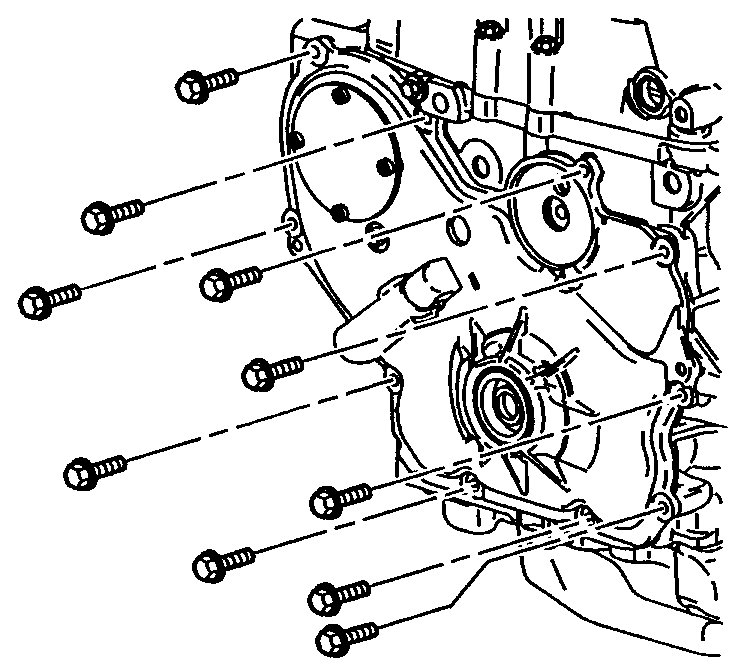
Fig. 1 Engine front cover bolt replacement
Removal
1.
Remove exhaust manifold heat shield.
2.
Remove oxygen sensor.
3.
Raise and support vehicle.
...
Removal
1.
Relieve fuel system pressure as outlined
under "Precautions."
2.
Drain fuel tank.
3.
R ...
Chevrolet Cobalt Owners Manual
Chevrolet Cobalt Service Manual

 Exhaust Manifold, Replace
 Fuel Pump, Replace