
Chevrolet Cobalt Owners Manual: Steering Wheel Controls
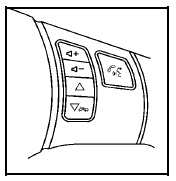
If equipped, some audio controls can be adjusted using the controls on the right side of the steering wheel.
 : Increases or decreases
volume.
 : Press to change radio
stations, select tracks
on a CD, or to select tracks and navigate folders on an
iPod® or USB device.
 : Press to silence the
vehicle speakers only. Press
again to turn the sound on. Press and hold longer than
two seconds to interact with the OnStar® or Bluetooth
systems.
 : Press to reject an incoming
call, or to end a call.
For more information, see Audio Steering Wheel Controls.
 Portable Audio Devices (Auxiliary Input or USB Port)
This vehicle may have an auxiliary input jack and
a USB port, located on the audio faceplate. External
devices such as iPods®, laptop computers, MP3
players, CD changers, USB storage devices, etc. ...
 Bluetooth®
For vehicles with an in-vehicle Bluetooth system, it
allows users with a Bluetooth enabled cell phone to
make and receive hands-free calls using the vehicle’s
audio system and controls.
The Blue ...
See also:
Chevrolet Cobalt Service & Repair Manual. Lube, Oil & Filter, Replace
Caution: Prolonged and repeated
contact with engine oil and grease will result in removal of natural oils
from skin, leading to dryness, irritation and dermatitis. In addition, used
engine oil and grease contains potentially harmful contaminants which may
cause skin cancer. Pr ...
Chevrolet Cobalt Owners Manual
- In Brief
- Seats and Restraint System
- Features and Controls
- Instrument Panel
- Driving Your Vehicle
- Service and Appearance Care
- Maintenance Schedule
- Customer Assistance Information
Chevrolet Cobalt Service Manual
- Air Bags
- Air Conditioning & Heater
- Body & Frame
- Brakes
- Cooling System
- Driveline
- Electrical
- Electronic Stability Controls
- Engine Service
